Review Comments (0) Screenshots (4) Questions & Answers (0) Votes (3) Awards (8) Wiki  
-Please log in to rate
3.7 3.7/5 (3)
-FreeGamesWay.com
-2.11
- www.myplaycity.com
- 520 people
Download Advanced Lines

2.02 MBDownloaded 103 times


Review

This is a quick review

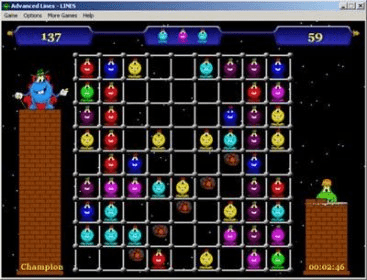
Advanced Lines is an incredibly addictive color matching game with a bunch of sound effects and a graphics galore. It includes three different game types: lines, squares, and blocks. Advanced Lines is played on a 9x9-square board, which is filled with colored objects. The aim of the game is to build various figures out of objects of the same color. You score points by building figures, which eventually disappear. The deal is to make as big a score as you can get and prevent the objects from filling up the playing area. Once you fill it up the game ends. There are two available objects types: Static - color balls and Dynamic - animated funny characters. Dynamic objects are good for kids, beginners or just laid-back players. There is a great selection of options to tweak the game to your liking: outstanding graphic and background music, which will make the game so much fun. Our user-friendly interface will make it difficult to put the game down. Advanced Lines can be enjoyed by players of all ages. It is easy to learn and has several difficulty levels. Moreover, it develops your logical thinking and spatial skills. Why not give it a shot?
 
The following full-length review applies to version 2.1

Advanced Lines 2.1 is a great free puzzle game. It can be represented either by dynamic objects (characters) or static objects (dots). The objective of the game is to put together five objects of the same color and it can be cone in a vertical way or horizontal. To move the objects you just have to click in the empty space where you want it to move and it will do so if there is a free road from its original point to the destination you choosed. With each movement you do, 3 more objects will appear on the board and you will only get rid of them when you align 5 objects with the same color. If you get tired of making lines with the objects you can choose to create squares or irregular blocks, this can be changed in the upper task bar under the options/linestype. Also under Options you will be able to change the difficulty by changing the number of colors for the objects, from 3 to 8 colors. Another feature that can be changed is the game field, in this option you can choose between molecular, techno and classic field and also you are able to change the field background between invisible, gray and blue, the background can be changed from space to black, waves and army. The sounds can be turned on, off or you can choose between 5 shemes. At the menu you will also find direct links to other games like Tetris Planet, Balltris and Renju World. Finally it has a Help section that will be very usefull if you need assistance.
Advantages
  • Runs smoothly without affecting the PC´s performance.
Disadvantages
  • none

Reviewed by: Augusto Rivera

Reviewer rating: Editor's rating 4

Screenshots

Main Window Main Window Free Games Way Main Page Free Games Way Main Page Installation Welcome Screen Installation Welcome Screen Game in Action Game in Action

Latest comments


There are no comments, be the first one!
Add new comment
Tag cloud
Download siClient

Email Address:

Password:

Register now »

Forgot password?

Copyright © 2009, Informer Technologies, Inc. About| Privacy and terms| Help| Feedback